


From the outside, it may appear that scientists are mostly spending their time at the bench, running experiments, pipetting liquids into different tubes, or working with model organisms. While this can be true, scientists and PhD students, especially, actually spend a big portion of their time reading. Whether it’s gathering information for a project, reading the newest papers in your field, or revising your own writing, there are always lots of papers to be sifted through.
While some like to print their papers and keep them in a pile on their desk, I prefer to organize the papers I read digitally. In this article, I’ll share my paper reading routine, which I developed through a bit of trial and error as I wrote my thesis in undergrad, worked as a Research Assistant in Boston, and now as I start my PhD.
Annotating
While some skip this, I am a HUGE FAN of annotating almost everything I read. Currently, I do this using Zotero. Zotero is free to use, and you can download it on multiple devices. This allows me to have it on my iPad, which is how I annotate using my Apple Pencil, and my laptop. As you annotate on one device, it will automatically update the document on the other.
As I set up to read a new paper, I open it on both of these devices. I use my laptop to read and highlight the text of the paper and simultaneously look at the figures on my iPad, annotating them as I read. I find this to be super helpful because when I reference an old paper, I’m often looking for the information that I need in the figures, rather than in the text. Annotating the figures puts all of this information in one place, so I can quickly find what I need.
If I don’t have my iPad and am reading solely on my laptop, I also enjoy adding “Notes” to highlighted text in Zotero. I normally use this function to add any questions, ideas, or connections I am making between papers. I find that I do this most when I am reading a review article or reading sections of a paper that have a lot of background and future directions, such as the introduction or the discussion.
Storing and Organizing
Another thing I enjoy about Zotero is the ability to make folders to organize papers. I usually will organize them based on the project, the lab I am reading about, or the class I am reading the papers for. I especially enjoy reading papers for class in Zotero, so that if I have to reference them in an assignment later, I can quickly add the citation to whatever document I am working on.
Further, when writing a paper, I will often create a separate folder in Zotero for easy access to citations when writing. While Zotero can be a little slow as the length of a document increases, I still find that it’s the easiest way to add citations to a document that I’m working on.
The Key Here: make the most important information easily accessible
One way I’ve done this is by creating a spreadsheet of all of the papers I’ve read. In this, I include the title, the PubMed ID, a link to the paper, a quick summary, the date read, and keywords that I can filter when needed. I really enjoy using Notion (which I’ve talked about with her a lot) for a few reasons:
Access on all devices - since Notion saves your work in the cloud, if I don’t happen to have my personal computer, I can log into Notion on any browser and see my work.
Ability to filter and reorder - When you make a spreadsheet in Notion, you can filter by tag, only show papers that are read/ unread, organize with the newest/ oldest papers first, etc. While a lot of this is also possible in Excel, I find that I really like the look of Notion.
I also take notes about each paper I read in Notion - What I especially like about Notion is that each entry in my spreadsheet can open up into a separate page. This gives me space to take notes on the paper, which usually consists of background information that I may want to reference quickly. While I don’t do this all the time, I find that it’s nice to have an easy-access place for key facts so that I can skip going through my notes on the paper itself.
A peek into my library

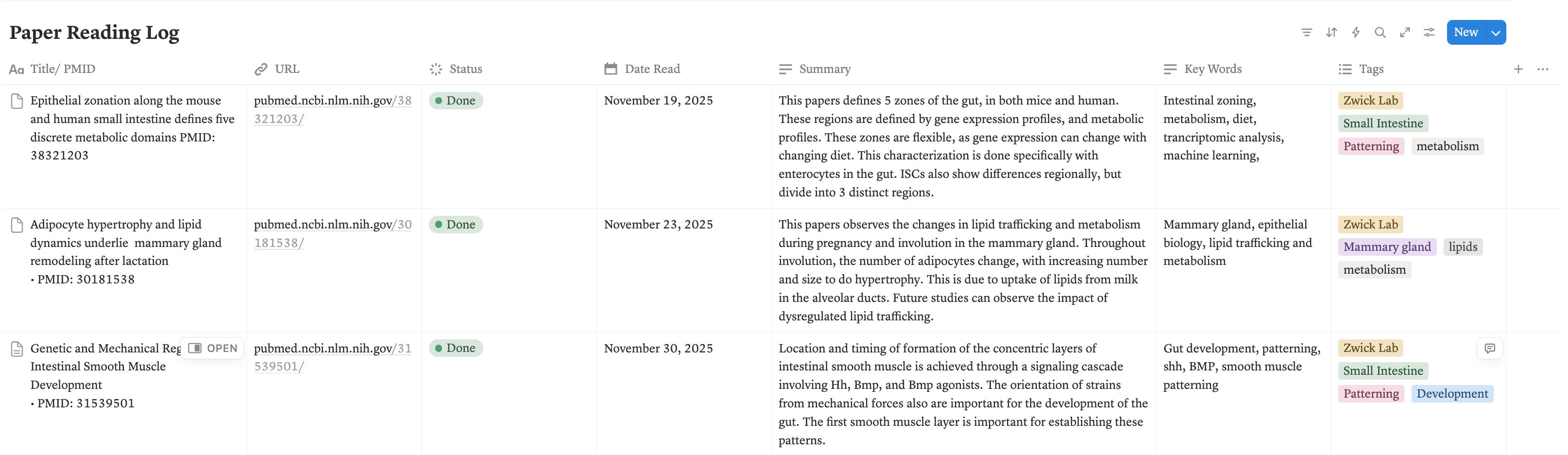
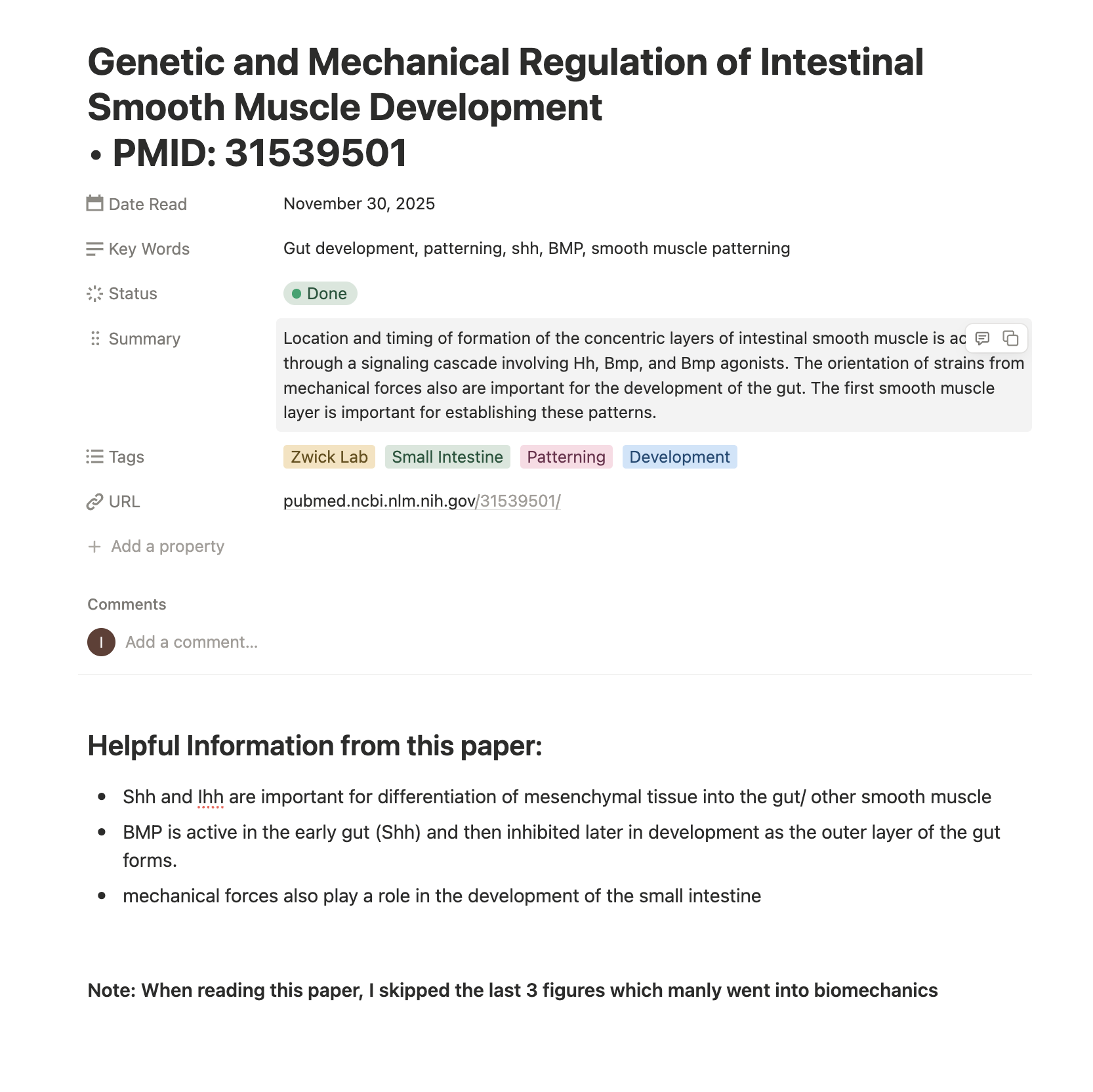
Notion pages like these are shareable, so if you’d like a copy of my spreadsheet that you can fill out yourself, send me a message or comment below!
There you have it!
Here’s how I’ve been reading and organizing all of the papers I’ve read so far as a grad student. Please comment below with any questions, thoughts, and comments!
Hi, I’m Isabella!
I’m a Ph.D. student passionate about science communication and mentoring younger scientists. I post on My Ph.Diary. on Sundays, Wednesdays, and Fridays, sharing my lab experiences, advice on navigating research, and any biological topics that pique my curiosity. Subscribe below to stay updated!
Thanks for reading My Ph.Diary.! Subscribe for free to receive new posts and support my work.
It's so important to establish a reading routine early in the PhD programme!
That's so interesting... My research journey will resume soon. I'll try Zotero to read papers. And your summary in notion really look's easily skimmable... One question I wanted to ask; can we draw link between 2-3 papers in Zotero??? And, is it same as Mendeley????